We are pleased to announce the release of zml/llmd 20261106.0. This week, we are bringing two new models,
asynchronous scheduling in beta, and more performance work across our backends.
Beam-1.0 and Ripple
This release brings support for Reflection’s Beam 1.0 and Day 1 support for Ricursive’s Ripple (well, technically Day 0, but we didn’t want to derail the release).
We’re pretty happy with the performance:
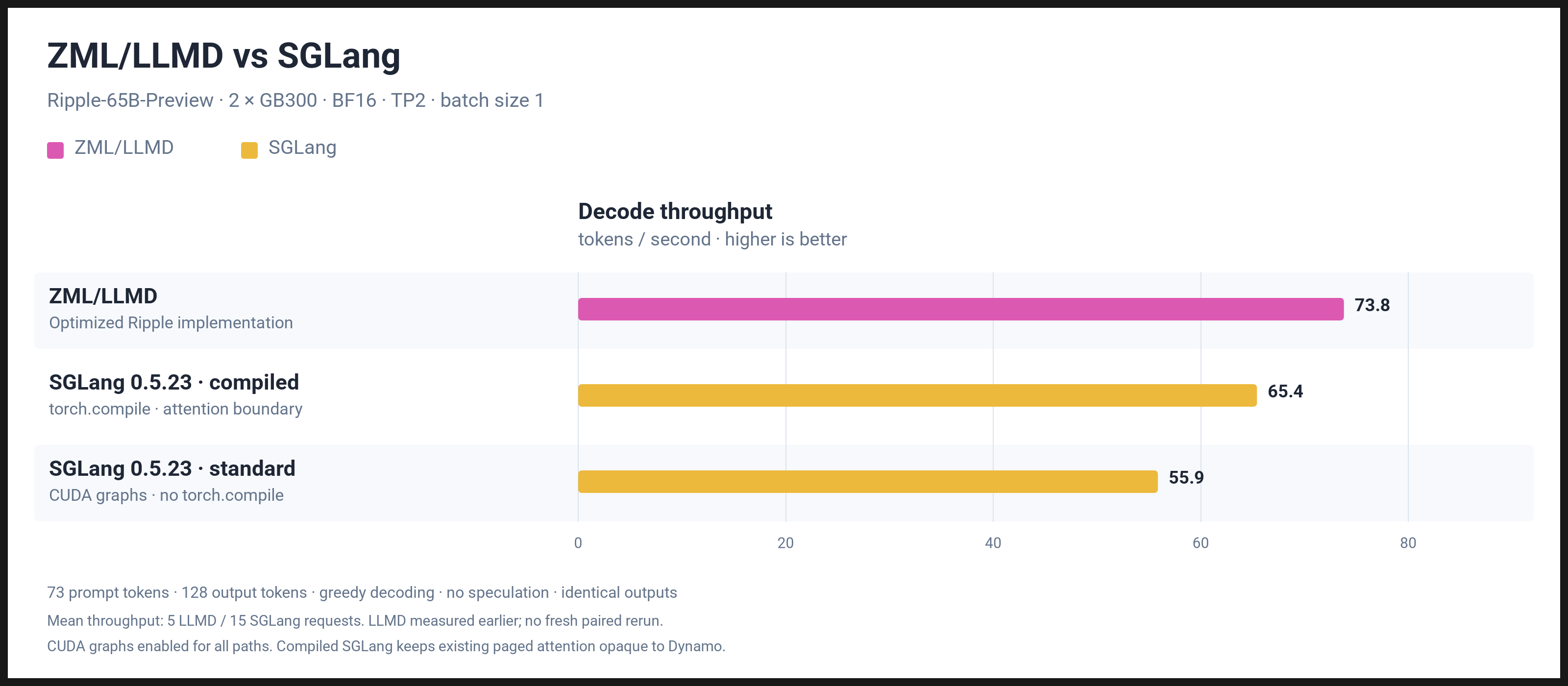
The list of models supported by zml/llmd is growing, here is a full list of the supported models:
- Qwen 2, 3, 3.5, 3.6 and 3.8 series (dense and MoE)
- Gemma 3 and 4 series (dense and MoE)
- LFM2.5 series
- Mistral 3 and Ministral series
- Llama 2 and 3 series
- Poolside Laguna S 2.1
- DeepSeek 4.1 Flash
- Muse Glimmer
- Qwen3.8 Flash Next
- Xiaomi MiMo V2.6
- Mistral Large 4
- GLM 5.2
- GLM 5.3
- LFM 3
- Beam 1.0
- Ripple 65B
Asynchronous scheduling beta
We have added asynchronous scheduling to Llama and Gemma 4. The idea is simple: while the accelerator is running one step, the CPU can prepare the next one. Less time waiting between steps.
You can enable it with --async-scheduling. It is opt-in for now. Speculative decoding still uses the synchronous
path, and Llama’s asynchronous path also works with data parallelism. The next release should bring more models on board.
This is in beta. Once we are satisfied with the performance and stability, we will make it the default.
Data parallelism beta
Llama now supports --data-parallel. This distributes requests and their KV caches across groups of devices.
We also improved weight sharding for this configuration to reduce communication between those groups.
For example, --data-parallel=2 splits the work across two groups.
On 2×RTX 5090, our Llama development benchmark went from 700 to 1,600 tok/s with --data-parallel=2,
--batch-size=16 and --token-batch-size=256. That’s a 2.3× improvement to the data-parallel path.
The same benchmark with --data-parallel=1 stays at roughly 2,000 tok/s, so the best configuration
still depends on the workload.
This is still in beta.
Faster LFM 3
Last week, we brought LFM 3 to zml/llmd. This week, we improved how its embeddings are sharded across devices, which improves throughput when running it on multiple GPUs.
Faster prefill
The hill climb continues. This week, we worked on Gated DeltaNet, with new CuTe kernels for NVIDIA and Fly kernels for AMD. The NVIDIA and AMD implementations improve prefill performance over the previous Triton backend.
On a single MI300X, running Qwen3.8-27B with 32K-token prompts and bs=16, time to first token improves as follows
(using z-lab/Qwen3.8-27B-DFlash2 for speculative decoding):
That’s about 12.5% less waiting for ordinary prefill and 14.5% less with speculative decoding.
DeepSeek-V4.1 also gets optimized mHC kernels for NVIDIA Blackwell and AMD MI300X.
At 8,192 tokens, our DeepSeek prefill benchmark goes from 35,016 to 40,115 tok/s, a 14.6% improvement from the combined kernel and sharding changes.
The mHC kernel benchmarks also show where some of that improvement comes from.
At 32,768 tokens:
We also removed unnecessary waits in the Qwen 3.8 Flash Next and MiMo-V2.6 forward passes.
Serving improvements
A few fixes also made it into this release:
- Cache hits are now reported in API usage responses through
prompt_tokens_details.cached_tokens. - Prompts that exceed the context limit return HTTP
400withcontext_length_exceeded. Unsupportedresponse_formatvalues also return HTTP400. - When
enable_thinkingis omitted, we now respect the model’s default. This fixes Gemma 4’s default behaviour. - We fixed KV-cache matching in LFM 2 and an issue with grouped-weight packing.
- Tini is now the default entrypoint for all zml/llmd container images, which should improve signal handling and shutdown behaviour.
Try it today
NVIDIA
docker run -p 8000:8000 --shm-size=256GB --gpus=all -e HF_TOKEN -it zmlai/llmd:cuda \
    --model=hf://Qwen/Qwen3.8-Flash-Next
AMD
docker run -p 8000:8000 --shm-size=256GB --device=/dev/kfd --device=/dev/dri -e HF_TOKEN -it zmlai/llmd:rocm \
    --model=hf://Qwen/Qwen3.8-Flash-Next
Intel
docker run -p 8000:8000 --device=/dev/dri -e HF_TOKEN -it zmlai/llmd:oneapi \
    --model=hf://Qwen/Qwen3.8-27B
Google TPU
docker run --net=host --privileged -e HF_TOKEN -it zmlai/llmd:tpu \
    --model=hf://Qwen/Qwen3.8-27B
Apple Metal
brew install zml/zml/llmd
llmd --model=hf://LiquidAI/LFM3-1.7B-FP8 --batch-size=4